
By Max Milano (Tech Writer)
N-Gram analysis is your secret weapon for B2B Google Ads success.
A SaaS founder I worked with last year came to us with a relatively common problem. His B2B Google Ads campaigns were performing well. Traffic was steadily up, click-through rates were strong, freemium signups were increasing, and demo requests were coming in at a healthy pace. From a marketing perspective, everything looked like growth, but the problem was that revenue had not moved.
When we opened his HubSpot CRM, the gap between perception and reality became painfully clear. What looked like momentum in his Google Ads dashboard was, in truth, a serious B2B Google Ads Lead Quality issue. Volume was up, but closed sales were missing.
Their HubSpot CRM showed that more than 60 percent of the new leads generated the previous month were disqualified by their sales team. Sales reps were busy fielding requests for “free templates” and inquiries about a “free forever” version of their SaaS product, rather than booking calls with serious buyers.
Their pipeline was not building predictable revenue; it was filled with noise.
Each week, the sales team spent valuable hours sorting through unqualified submissions while searching for the few genuine opportunities hidden among a flood of irrelevant clicks. Marketing was seeing rising lead numbers, but sales only saw wasted time. Between those two realities sits the true cost of poor B2B Google Ads lead quality.

The problem wasn’t their bidding strategy. It wasn’t their ad copy, landing pages, or budget. It was poor buyer intent. This is the silent sales pipeline killer that can creep into your B2B Google Ads and begin to fuel curiosity rather than purchase behavior.
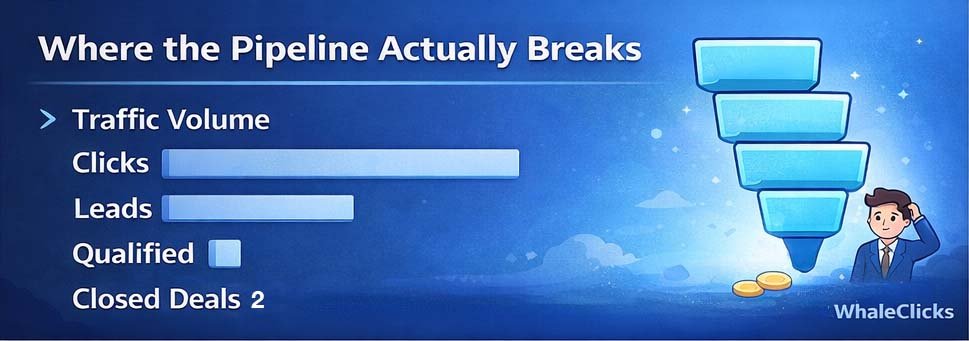
This is what their funnel actually looked like:
Traffic Volume
Clicks ████████████████████
Leads ████████
Qualified ███
Closed Deals █
They had lots of activity at the top, but almost nothing making it to the bottom (I.E. sales).
This is exactly the problem that negative keywords and n-gram analysis are built to solve. So if you want predictable and scalable B2B Google Ads results, you need to understand both.
What Exactly Are “Negative Keywords” And How To Use Them in B2B Google Ads
Before we get into n-gram analysis, let’s make sure we’re on the same page about negative keywords, because everything else builds on this foundation.
Negative keywords let you exclude search terms from your Google Ads campaigns, so your ads don’t show for queries that have nothing to do with your business. The logic is simple: better targeting means your budget reaches people who are actually in the middle of a buying process, not people who are browsing, researching careers, or hoping to find something for free.
In B2B, this distinction is everything. Someone searching for “enterprise accounting software pricing” is evaluating vendors and getting ready to make a decision, but someone searching for “accounting software jobs” or “accounting software free download” is either trying to pay their rent or avoid paying yours, and choosing who not to target is just as strategic as choosing who to pursue.
When you’re building out your negative keyword list for a B2B Google Ads search campaign, start by looking for terms that go well with your keywords but carry a completely different intent signal. For example, If you run a B2B IT consultancy, words like jobs, salary, course, certification, free, template, and internship should almost always be excluded. Those searchers are not buyers.
One thing that trips up many advertisers is how negative keyword matching actually works. Unlike positive keywords, negative keywords don’t match close variants automatically. So if you exclude the broad negative “flowers”, your ad won’t show for “red flowers”, but it could still show for “red flower”. In B2B accounts, that means you often need to manually add both singular and plural versions of important exclusions to get full negative keyword coverage.
You can apply negatives at the campaign level or build account-level negative keyword lists that apply across the entire account. Account-level lists are particularly powerful in B2B because they let you block universal waste terms like jobs or free across every search and shopping campaign in one clean move.
There are three match types for negative keywords, and each one behaves differently:
Negative Broad Match: Blocks your ad whenever the search contains all of your negative keyword terms, regardless of order. Add “running shoes” as a negative broad match, and you’ll be excluded from “blue running shoes” and “shoes running” alike.
Negative Phrase Match: Blocks your ad only when the terms appear in the same order. Add “running shoes” as a negative phrase, and you’ll be excluded from “blue running shoes,” but “shoes running” could still trigger your ad.
Negative Exact Match: Is the most precise because it blocks your ad only for that specific sequence of words, with no extra terms allowed.
In B2B, broad negatives work well for obvious disqualifiers: free, jobs, salary, template, and similar terms that have no place in a commercial buying query. Phrase negatives are more surgical and useful when you want to block specific combinations without accidentally cutting off legitimate volume.
Negative keywords are genuinely powerful. But when you’re managing them one by one, you’re always playing catch-up and reacting to waste after it’s already happened. That’s where n-gram analysis changes the game entirely.
What Is N-Gram Analysis For Google Ads?
In the context of Google Ads, an n-gram is simply a sequence of consecutive words pulled from a search query. The “N” just refers to how many words are in the sequence.
A 1-gram (unigram) is a single word. A 2-gram (bigram) is a two-word phrase. A 3-gram (trigram) is three words in sequence.
When you analyze your Search Terms Report through the lens of n-grams, you stop looking at individual queries and start identifying recurring patterns, I.E., words and phrases that keep showing up across dozens or hundreds of different searches, and quietly draining your budget without generating any qualified leads pipeline.
Think of it as zooming out. Instead of asking “Is this one search term bad?” you start asking “What themes are costing me money?” And that shift in perspective is where the real leverage lives.
A Simple Example on N-Gram Analysis That Makes It Obvious
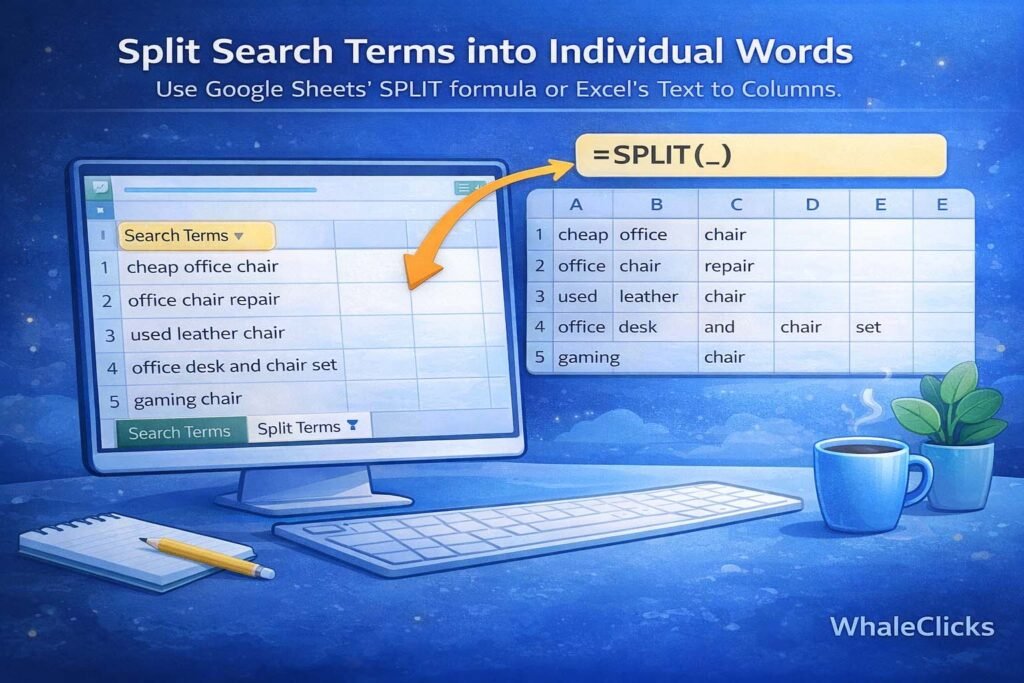
Say you sell premium leather office chairs to corporate buyers. You open your Search Terms Report and find a mix of queries like these:
- cheap office chair
- office chair repair
- used leather chair
- office desk and chair set
- gaming chair
Each one looks different on the surface. But when you break them apart into n-grams, the pattern becomes impossible to ignore.
Your unigrams surface: cheap, repair, used, desk, gaming. Your bigrams show: cheap office, chair repair, gaming chair, desk and.
Now ask yourself a straightforward question: Do you sell cheap products, repair services, used furniture, desk bundles, or gaming chairs?
If the answer is no (and it probably is), then those root words become your negative keyword candidates. Here’s what that waste pattern looks like aggregated:
Word Cost Conversions
cheap ███████ 0
repair █████ 0
used ████ 0
gaming ███ 0
desk ██ 0
Instead of manually sifting through queries like ‘cheap office chair near me’ or ‘used leather chair for sale’ and adding each one individually, you identify the root word and block the entire theme in a single move. One decision eliminates dozens of irrelevant search variations. That’s what leverage actually looks like in paid search.

Why N-Gram Analysis Matters So Much In B2B
B2B Google Ads are expensive by nature. Your cost per click is higher, your sales cycle is longer, and your average deal value is larger. That means every irrelevant click doesn’t just waste a few dollars; it pollutes your data and trains your smart bidding algorithm on the wrong signals, thereby generating poor-quality leads that your sales team will never close.
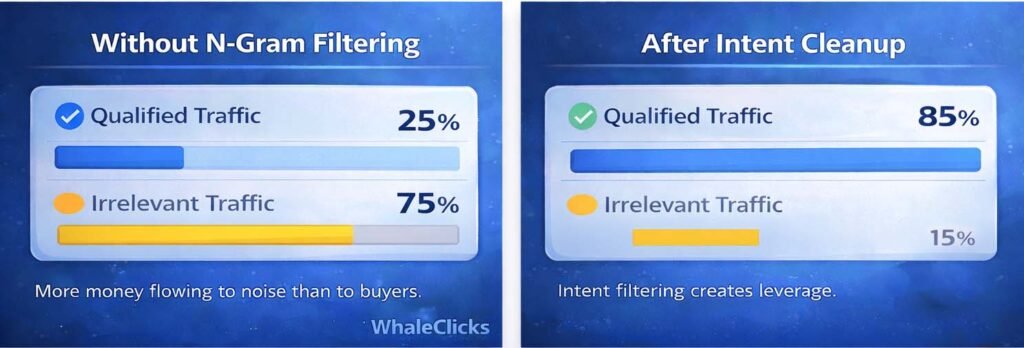
Without weekly n-gram analysis of your search terms report, this is what your budget allocation will look like:
Budget Allocation Without N-Grams
Qualified Traffic ███████
Irrelevant Traffic ████████████
More money is flowing to noise than to buyers. And the problem compounds because negative keywords management without n-grams is inherently reactive. You add exclusions one at a time, after the damage is done, and waste creeps back in through slightly different phrasing the following week.
With n-gram analysis, you catch high-spend waste themes early and block entire categories of bad intent before they have a chance to erode performance. After a proper cleanup, the picture shifts considerably:
After N-Gram Cleanup
Qualified Traffic ██████████████
Irrelevant Traffic ██
This is particularly critical in broad match campaigns, where Google’s matching behavior is aggressive by design, and also in Performance Max campaigns, where search term visibility is limited, and you have to make the most of every control lever available to you. In large B2B accounts processing thousands of search queries per month, n-gram analysis isn’t an advanced tactic. It’s operational hygiene.
A Real Account Example Of N-Gram Analysis
Here’s what a single month of aggregated n-gram data might look like in a real B2B campaign:
free $320 0 conversions
jobs $210 0 conversions
pdf $180 0 conversions
template $150 0 conversions
The individual queries behind those numbers looked like this: “free contract template pdf”, “marketing plan template free”, “job application template”. Handled manually, you’d be adding negatives all week and still not catching everything.
Instead, by running an n-gram analysis, you just need to add four broad negative keywords: “free”, “jobs”, “pdf”, “template”, and instantly cut off an entire category of non-buying intent. Your traffic becomes more commercially focused, improving your conversion rate and Google’s smart bidding algos receive cleaner data to work with. Do this every week and you’ll soon see your cost per lead starting to move in the right direction.
How To Do N-Gram Analysis In Google Sheets or Excel Using Your Google Ads Search Terms Report
The process of running a Google Ads Search terms report analysis using n-grams is more straightforward than most people expect, and you don’t need expensive third-party software to do it well.
Start by downloading your Google Ads Search Terms Report. Pull in search term, clicks, cost, conversions, and conversion value.
Open the file in Google Sheets or Excel, then create a new tab where you split each search term into individual words. In Google Sheets, the SPLIT formula with a space as your delimiter handles this cleanly. In Excel, Text to Columns with space as the separator does the same job.
Once your queries are broken out word by word across separate columns, the next step is to stack everything into a single column. Excel’s Power Query makes this easy using an unpivot operation. In Google Sheets, a manual flattening approach or a simple copy-paste into one long list works fine for most accounts.
With a single column of words tied back to their corresponding cost and conversion data, build a pivot table. Set your rows to the word column, then pull in the sum of cost, the sum of clicks, and the sum of conversions as your values. Sort by cost descending, then filter for words with significant spend and low or zero conversions.
Those are your negative keyword candidates.
For 2-gram analysis, concatenate adjacent word columns. Combine columns one and two, two and three, three and four, and so on, then repeat the pivot process. The goal isn’t perfection. It’s pattern recognition at a speed you simply can’t achieve by reviewing queries one at a time.
In B2B accounts with meaningful spend, running this weekly is worth every minute it takes.
N-Gram Scripts
Some advanced advertisers use automated n-gram scripts to speed this process up even further. These are Google Ads Scripts (JavaScript snippets you install inside the Google Ads Scripts section) that automatically parse your Search Terms Report, extract recurring 1-grams and 2-grams, and aggregate cost and conversion data for you on a schedule. Implementation typically involves creating a new script in Google Ads, pasting in the code, authorizing it to access your account, and setting it to run weekly with results pushed into a Google Sheet. For large accounts processing tens of thousands of queries per month, scripts can save time. That said, for most B2B accounts, the spreadsheet method outlined above is more than sufficient — it’s transparent, flexible, and keeps you close to the data.
The Strategic Filter Most People Skip
Not every zero-conversion word deserves to be blocked, and this is where judgment matters more than your spreadsheet does.
In B2B, some research-heavy queries have a legitimate role in the early stages of the buying journey. A search like “what is project management software” may not convert immediately, but it could represent a buyer in early evaluation mode, I.E., someone worth staying in front of. While a search like “project management software free” tells you everything you need to know about that person’s willingness to pay.
When you’re reviewing your n-gram output, the real question isn’t just whether a word produced zero conversions. It’s whether that word signals the wrong buyer or simply an early-stage buyer. One warrants exclusion. The other might be worth holding onto, especially if your B2B sales cycle runs long.
Match Types and Precision In B2B
When you’re adding n-gram-derived negatives, match type selection matters more than most advertisers realize.
Broad negatives are the right tool for universal disqualifiers like “free”, “jobs”, “internship”, “salary”, “pdf”, “template”, I.E., words that almost never appear in a genuine commercial query for your service. Phrase negatives are more precise and work well when you want to block specific harmful combinations without cutting off related volume you actually want. Exact negatives are best reserved for highly specific irrelevant queries that don’t represent a broader pattern worth blocking outright.
The tension in B2B is real: over-block and you restrict your sales pipeline. Under-block and you waste budget. Getting the balance right comes down to knowing your ideal buyer persona deeply, what language they use, what they search for at different lifecycle stages, and where the edge of legitimate intent actually sits.
How N-gram Analysis Unlocks Scalable B2B Growth
B2B Google Ads success should never really be about chasing more clicks. It’s about improving the quality of the traffic you’re paying for and giving Google’s algorithm the clean data it needs to optimize effectively.
When you remove irrelevant intent systematically through n-gram analysis, the downstream effects compound quickly. Conversion rates improve because a higher proportion of your traffic actually has purchase intent. Google’s smart bidding gets more accurate signals and starts making better decisions, your CPA stabilizes, and then drops.
Here’s what that typically looks like in practice:
Before Cleanup
Conversion Rate: 2.1%
Cost per Lead: $480
After Cleanup
Conversion Rate: 3.4%
Cost per Lead: $295
But the most important outcome isn’t on your Google Ads dashboard. It’s in your HubSpot CRM. When your sales team starts receiving leads that are actually qualified, I.E., people who are genuinely searching for what you sell, and at a stage where they’re ready to have a serious conversation, the relationship between marketing and sales changes. That alignment is where the compounding growth of N-gram analysis actually comes from.
N-gram analysis give you visibility into how your ideal customers actually search. It reveals their language patterns, intent signals, and noise themes hidden within thousands of queries that would otherwise appear as undifferentiated data. It turns your Search Terms Report from a messy export into a strategic asset.
In competitive B2B markets, that kind of intelligence is a genuine edge.
The Bottom Line
If you’re running B2B Google Ads without N-gram analysis, you’re almost certainly funding irrelevant intent, and the damage shows up in your low close rates and high CPL.
Negative keywords protect your budget, and N-grams tell you which negatives to actually add. Together, they create the structure, clarity, and control that separate B2B Google Ad accounts that scale cleanly from accounts that just spend more.
If you’d rather have a team doing this systematically and relentlessly on your behalf, that’s exactly what we do at WhaleClicks. Our Google Ads management is built around intent filtering, advanced N-gram analysis, and performance optimization, specifically designed for B2B growth.
Contact us today to help you drive more leads and sales for less.
Frequently Asked Questions About N-Gram Analysis In Google Ads
What is an n-gram in PPC?
An n-gram in PPC is a sequence of consecutive words pulled from a search query inside your Google Ads Search Terms Report. The “n” refers to the number of words in the sequence.
- A 1-gram (unigram) is a single word like free or jobs.
- A 2-gram (bigram) is a two-word phrase like free template.
- A 3-gram (trigram) is a three-word phrase like project management software.
In Google Ads optimization, n-gram analysis helps advertisers identify recurring words or phrases that consume budget without generating qualified leads. Instead of reviewing individual search terms one by one, you analyze patterns at scale.
How Often should I Run N-Gram Analysis In Google Ads?
For active B2B accounts, n-gram analysis should be run at least once per week.
If your account processes thousands of search queries per month, weekly reviews prevent wasted spend from compounding. For smaller accounts, bi-weekly reviews may be sufficient.
Running n-gram analysis regularly allows you to:
- Identify new waste themes early
- Add negative keywords before costs escalate
- Improve Smart Bidding performance with cleaner data
- Maintain healthy lead quality in the CRM
In scaling accounts, this isn’t an advanced tactic — it’s operational hygiene.
Do N-Grams Work For Performance Max Campaigns?
Yes, but with limitations.
Performance Max provides limited search term visibility compared to standard Search campaigns. However, when search query data is available, n-gram analysis can still uncover recurring waste patterns.
In Performance Max, n-grams are especially useful for:
- Identifying non-commercial themes (e.g., free, jobs, salary)
- Strengthening account-level negative keyword lists
- Cleaning up signals used for audience and intent modeling
While you don’t have full transparency, applying n-gram insights at the account level still improves intent filtering and overall efficiency.
What’s The Difference Between N-Gram Analysis And Negative Keyword Research?
Negative keyword research is about deciding what to exclude.
N-gram analysis is how you discover what needs to be excluded at scale.
Without n-grams, you react to individual bad queries.
With n-grams, you eliminate entire categories of waste in one move.
Can N-Gram Analysis Improve Conversion Rates?
Indirectly, yes, often significantly.
When you remove irrelevant search themes, a higher percentage of your traffic carries commercial intent. That typically leads to:
- Higher conversion rates
- Lower cost per lead
- Better Smart Bidding optimization
- Improved sales team alignment
Cleaner intent produces cleaner performance data, and that compounds over time, resulting in more sales and increased ROI.